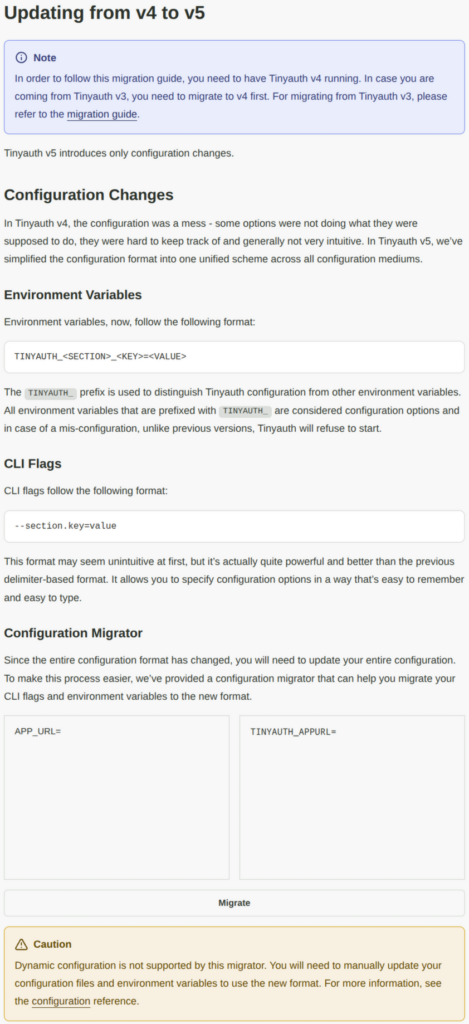
I’ve been running Tinyauth for quite some time and it’s been working great. Last night something broke after backup and the regular auto update/start of the docker image. Checking Tinyauth site https://tinyauth.app/docs/breaking-updates/4-to-5/ it’s clear some configuration changes is needed to go from v4 to v5.
To get Tinyauth up and running until the configuration changes were done I changed docker repository from ghcr.io/steveiliop56/tinyauth:latest to ghcr.io/steveiliop56/tinyauth:v4
Reading at https://forums.unraid.net/topic/133764-support-grtgbln-docker-templates/page/14/ the unraid repository owner grtgbln had made an answer on the issues: “I don’t see any documented changes in terms of Docker container setup for v5. Issues with the config or anything inside the container are best directed at the upstream developer: https://github.com/steveiliop56/tinyauth/issues?q=sort%3Aupdated-desc%20is%3Aissue%20is%3Aopen“.
I continued reading documentation at https://tinyauth.app and it states that the Enviromental Variables has changed in v5.
I therefore do not agree with grtgbln’s answer on the issue and took the time to see if I could fix it myself.
Below is an example how my old Tinyauth config looks in Unraid (some stuff anonymized with xxxxxxxxxxx).
docker run
  -d
  --name='Tinyauth'
  --net='br0'
  --ip='xxx.xxx.xxx.xxx'
  --pids-limit 2048
  -e TZ="Europe/Berlin"
  -e HOST_OS="Unraid"
  -e HOST_HOSTNAME="Tower"
  -e HOST_CONTAINERNAME="Tinyauth"
  -e 'TCP_PORT_3000'='3000'
  -e 'SECRET'='xxxxxxxxxxx'
  -e 'ROOT_URL'='xxxxxxxxxxx'
  -e 'APP_URL'='xxxxxxxxxxx'
  -e 'USERS'='xxxxxxxxxxx:xxxxxxxxxxx'
  -e 'APP_TITLE'='xxxxxxxxxxx'
  -e 'BACKGROUND_IMAGE'='/resources/bg1.jpg'
  -e 'RESOURCES_DIR'='/mnt/tinyfolder'
  -e 'PORT'='3000'
  -e 'ADDRESS'='0.0.0.0'
  -l net.unraid.docker.managed=dockerman
  -l net.unraid.docker.webui='http://[IP]:[PORT:3000]/'
  -l net.unraid.docker.icon='https://raw.githubusercontent.com/nwithan8/unraid_templates/master/images/tinyauth-icon.png'
  -l 'traefik.enable'='false'
  -v '/mnt/user/appdata/tinyauth/':'/mnt/tinyfolder':'rw' 'ghcr.io/steveiliop56/tinyauth:v4'
4c09ad14614fbbeed2f66a0e086e53a2dd792a69ac742a30fcc5ffe2ade062b0To get new variables I used the Configuration Manager.
APP_URL changed to TINYAUTH_APPURL
USERS changed to TINYAUTH_AUTH_USERS
APP_TITLE changed to TINYAUTH_UI_TITLE
BACKGROUND_IMAGE changed to TINYAUTH_UI_BACKGROUNDIMAGE
RESOURCES_DIR changed to TINYAUTH_RESOURCES_PATH
ADDRESS changed to TINYAUTH_SERVER_ADDRESS
Both ROOT_URL and SECRET seems untouched.
With these new variables it’s time to change them using Unraid Web UI.
Go to Docker page, choose edit on the TinyAuth docker object. Go to bottom and choose “Add Another Path, Port, Variable, Label or Device”.
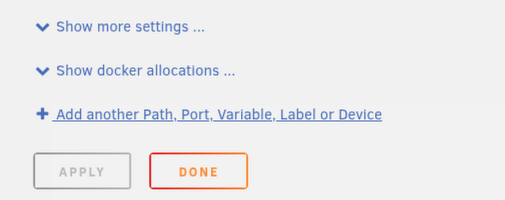
Add alla variables with the new name with your old data.
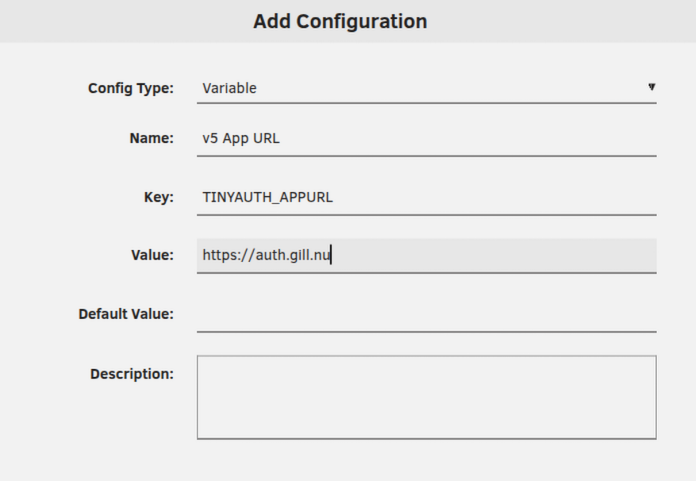
When all new variables is added don’t forget to change back to the repository ghcr.io/steveiliop56/tinyauth:latest (if you manually changed it to v4).
docker run
  -d
  --name='Tinyauth'
  --net='br0'
  --ip='192.168.10.125'
  --pids-limit 2048
  -e TZ="Europe/Berlin"
  -e HOST_OS="Unraid"
  -e HOST_HOSTNAME="Tower"
  -e HOST_CONTAINERNAME="Tinyauth"
  -e 'TCP_PORT_3000'='3000'
  -e 'SECRET'='xxxxxxxxxxx'
  -e 'ROOT_URL'='xxxxxxxxxxx'
  -e 'APP_URL'='xxxxxxxxxxx'
  -e 'USERS'='xxxxxxxxxxx:xxxxxxxxxxx'
  -e 'APP_TITLE'='xxxxxxxxxxx'
  -e 'BACKGROUND_IMAGE'='/resources/bg.jpg'
  -e 'RESOURCES_DIR'='/mnt/tinyfolder'
  -e 'TINYAUTH_APPURL'='xxxxxxxxxxx'
  -e 'TINYAUTH_AUTH_USERS'='xxxxxxxxxxx:xxxxxxxxxxx'
  -e 'TINYAUTH_UI_TITLE'='xxxxxxxxxxx'
  -e 'TINYAUTH_UI_BACKGROUNDIMAGE'='/resources/bg1.jpg'
  -e 'TINYAUTH_RESOURCES_PATH'='/mnt/tinyfolder'
  -e 'PORT'='3000'
  -e 'ADDRESS'='0.0.0.0'
  -l net.unraid.docker.managed=dockerman
  -l net.unraid.docker.webui='http://[IP]:[PORT:3000]/'
  -l net.unraid.docker.icon='https://raw.githubusercontent.com/nwithan8/unraid_templates/master/images/tinyauth-icon.png'
  -l 'traefik.enable'='false'
  -v '/mnt/user/appdata/tinyauth/':'/mnt/tinyfolder':'rw' 'ghcr.io/steveiliop56/tinyauth:latest'
07b880bd3fafc5ab541688eee8566c17470b08af83a0aec508d172c720ed1551Testing with the new config Tinyauth is up and running without errors with latest v5. The old Enviromental variables is still showing in Unraid but that’s something that needs to be fixed by repository owner. Next time I might start my own Unraid repository instead of relying on others, could be something new to learn.
Just want to add that I’m grateful for all the work repository owners like grtgbl do. It must be time consuming and it can’t be easy to keep them all up to date.